Let’s see if this sounds like you: you’re a money-conscious individual looking to take control of your finances. You’ve done your research and know for a fact that Piggyvest is the best way to save and invest with ease in Nigeria. Now, you’re wondering: how exactly does one use Piggyvest to supercharge their money moves?
You can use Piggyvest by first downloading the Piggyvest app and creating an account. Then, you can use our six savings plans — PiggyBank, Safelock, Target Savings, Flex Naira, Flex Dollar and HouseMoney™ — as well as our investment feature, Investify, to grow your money easily.
In this article, we’ll show you how to use Piggyvest like a pro by highlighting practical situations where you can use our incredible savings and investment plans. We’ll start with the autosaving feature on PiggyBank and work our way down to how you can get in on low-risk investment opportunities using Investify. Ready? Let’s jump right in!
How to use PiggyBank
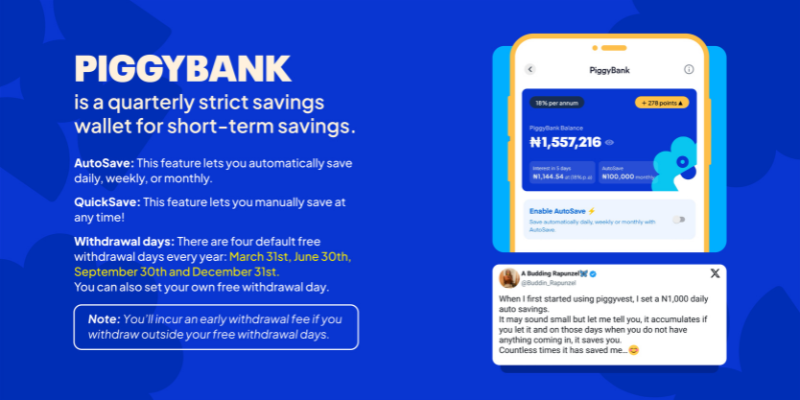
Our PiggyBank savings plan is a feature that allows you to save any amount automatically — even the casual ₦500 — all while earning up to 18% yearly interest. With PiggyBank, you can curb your expenses and build a healthy saving habit — regardless of how much you earn.
And since you can automate your savings to come in daily, weekly or monthly, you can embrace ease while focusing on other important aspects of your life (like building a lucrative business).
Think of it like a regular bank account with juicier returns and savings automation!
Here’s how to save automatically using PiggyBank:
- Login to the Piggyvest app.
- Go to “Savings.”
- Click on “PiggyBank” and “Enable AutoSave.”
- Then go to “Settings” and select “AutoSave Settings.”
- Set up your preferred AutoSave plan (for instance, if you want to save ₦10,000 monthly).
- Then click “Continue” and select your source of funds, preferred time to save and when you would like to start.
- Then click on “Complete.”

But what if you don’t have a consistent source of income? Like, if you’re a trader or business owner? Well, you can still use PiggyBank!
With Quick Save, you can manually fund your PiggyBank any day, anywhere, and anytime — without wahala!
Here’s how to manually fund your PiggyBank:
- To save manually, click on “Quick Save.”
- Enter the amount and source of funds.
- Then click on “Quick Save.”

Now, you can also enjoy the fantastic power of Quick Save!
How to use Safelock

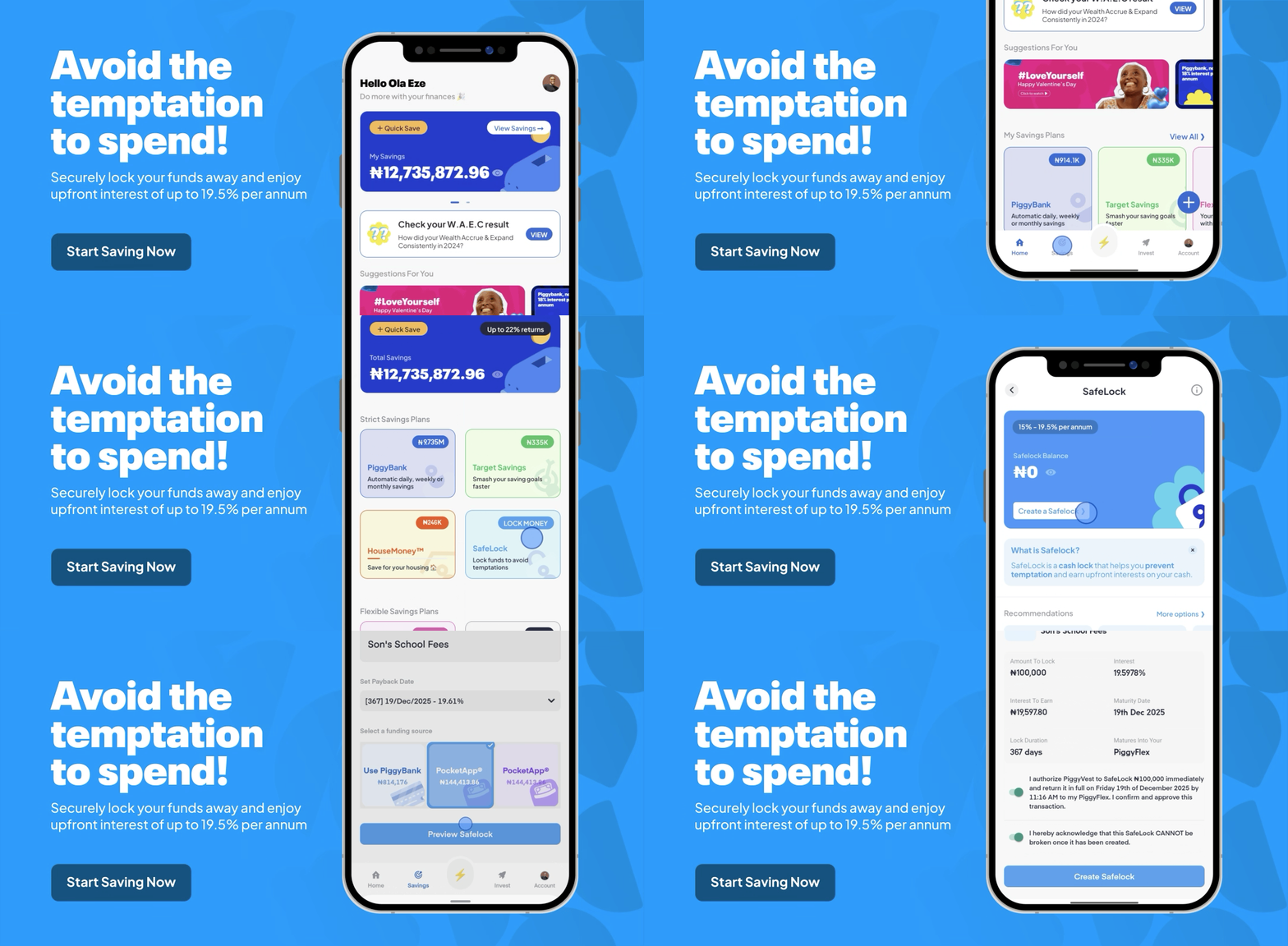
The best time to use the Piggyvest Safelock feature is when you have funds you don’t plan on spending until much later. With up to 21% annual interest rate, you can lock cash in this fixed savings plan for at least ten days and get your interest upfront!
So, if you already have money for that mid-year vacation or a fancy end-of-the-month dinner date with your significant other, you can avoid the temptation of spending it (and earn juicy returns today) using Safelock!
Of course, Safelock is also a fantastic feature to explore if you want to enjoy compound interest or build financial discipline.
Here’s how to use Safelock on Piggyvest:
How Do The Real Estate Investment Opportunities On Piggyvest Work?

- Log in to your Piggyvest app.
- Go to “Savings.”
- Click on ‘Safelock’ and select “Create a Safelock.”
- Choose how long you want to lock your funds.
- Enter the amount and title of the Safelock.
- Choose a payback date and select the source of funds.
- Click on “Preview Safelock” and authorise the transaction.
- Click on “Create Safelock.”
It’s that easy!
How to use Target Savings
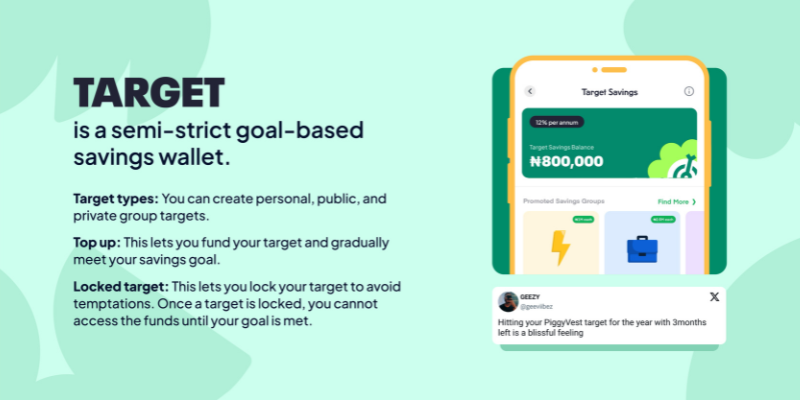
Target Savings on Piggyvest is best for users with an end goal. So, if you want to save for a new car or a laptop, this goal-oriented plan is your best bet. Plus, you can earn interest of up to 12% per annum while you save!
Here’s how to use Target Savings on Piggyvest:
- Log in to your Piggyvest app.
- Go to “Savings.”
- Click on “Target Savings” and select the plus sign.
- Click on “Create a personal target.”
- Give your target a name and select the category.
- Enter the amount you want to set a target for.
- Choose how often you want to save, the amount, day and preferred time.
- Click on “Continue” and enter start and end dates.
- Choose the source of funds.
- Confirm the target savings and click on “Create Target.”

You can also use Piggyvest Target Savings to save as a group — just like Moses and his friends did for their HND project!

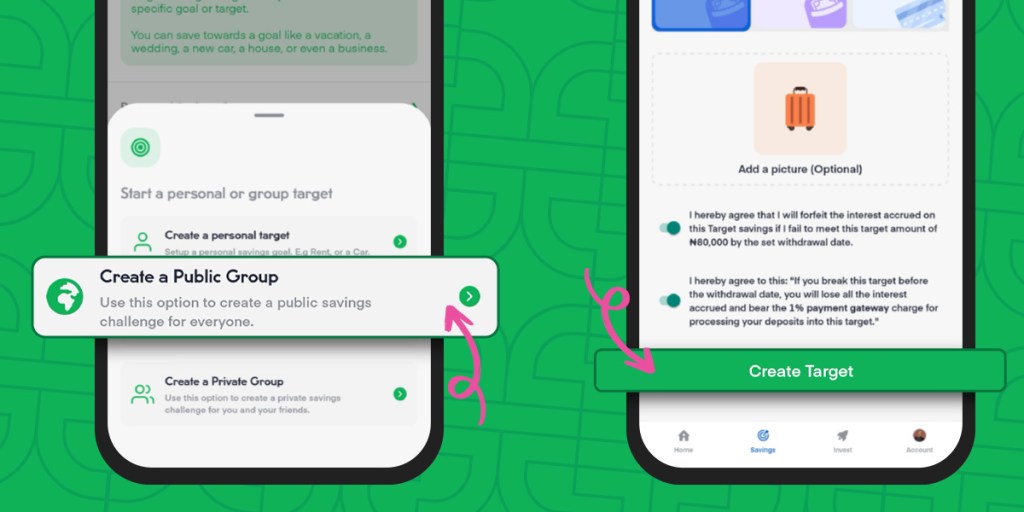
Here’s how to use Group Target Savings on Piggyvest:
- Log in to your Piggyvest app.
- Go to “Savings.”
- Click on “Target Savings” and select the plus sign.
- Click “Create a Public Group” or “Create a Private Group” — whichever you prefer.
- Give your target a name and select the category.
- Enter the group target amount.
- Choose how often to save, the amount, day and preferred time.
- Click on “Continue” and enter start and end dates.
- Choose the source of funds.
- Confirm the target savings and click on “Create Target.”
Want to learn more about Target Savings? Then, check out our quick dive into group savings on Piggyvest.
How to use Flex Naira
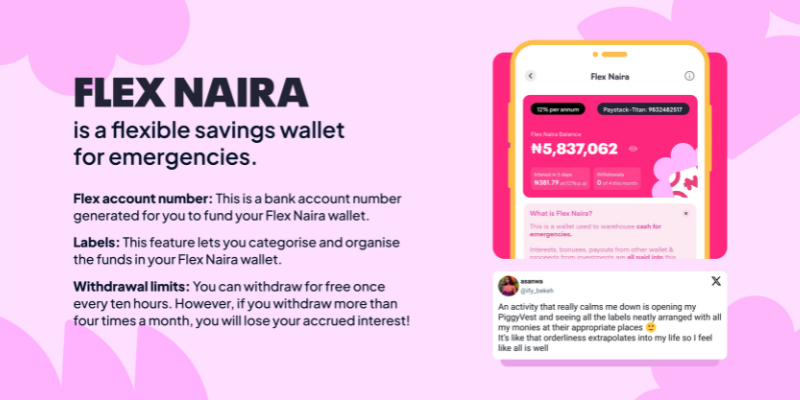
In our article on how to save money, we explored how vital emergency funds are and why you should create one as soon as you have an income. And while there are many ways to get started, Piggyvest’s Flex Naira is the best and easiest way to do it in Nigeria.
With Flex Naira, you can quickly rack up the required three to six months of living expenses for your emergency fund and earn up to 12% per annum on your savings! Plus, you enjoy up to four free monthly withdrawals to deal with any emergency without worrying about losing your accumulated returns!
But don’t take our word for it. Listen to Uchenna!
How To Keep Your Piggyvest Account Safe: 4 Security Tips From Our Cybersecurity Team


Here’s how to use Flex Naira on Piggyvest:
- Log in to your Piggyvest app.
- Go to “Savings”
- Click on “Flex Naira” and select “Add Money” (ensure you have linked your BVN).
- Make a transfer to your Flex Account number from your bank app.

Afterwards, you should see your funds in your Flex Naira wallet. Fun fact: You can turn your Flex Naira wallet into a passive income stream thanks to the power of compound interest!
How to use Flex Dollar

Want to save money in foreign currencies and beat inflation? Try Flex Dollar! With this feature, you can keep your funds in Dollars and preserve the value of your savings — all while earning 7% interest annually.
Here’s how to use Flex Dollar on Piggyvest:
- Login to your Piggyvest app.
- Click on “Savings.”
- Scroll down to Flex Dollar.
- Click on “Buy Dollar.”
- Enter how much dollars you want to purchase.
- Select your source of funds and authorise the transaction.
- Click on “Credit Flex Dollar.”

Need to convert your Dollar funds back to Naira? It’s easy!
Here’s how you can convert your Dollar funds to Naira:
- Click on “Convert To Naira.”
- Enter the amount and authorise the transaction.
- Click on “Convert to Naira.”

Your funds will be credited to your Flex Naira wallet instantly!
But what if you don’t want to convert your Dollars?
What Is Investing? A Comprehensive Guide For Beginners

With Piggyvest, you can easily withdraw your funds to your foreign or domiciliary account by following these steps:
- Select the “pay to bank” option
- Fill in the required information
- Then select “Send request bank transfer.”

And that’s it! Your funds will be credited to your bank account.
How to use HouseMoney™
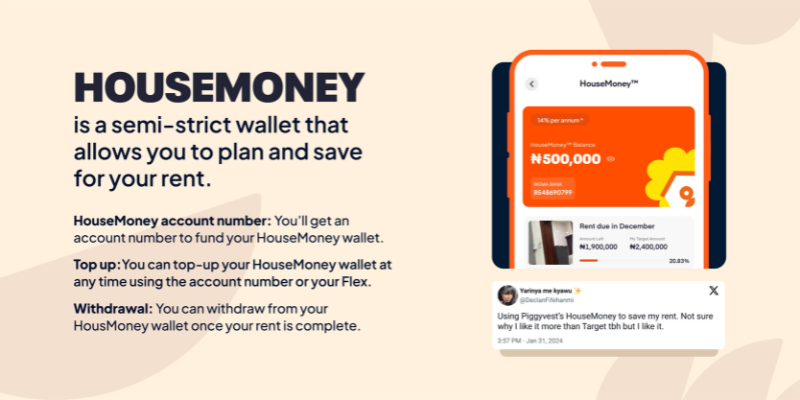
Your Piggyvest account isn’t just an excellent tool for keeping extra change or saving for a new car; it’s a handy companion for Nigerians who want to take charge of their bills and all parts of their finances — including rent. In fact, users like Uchechi have been using our platform to break up their house rent into manageable pieces for years now — with great success (and juicy interest!).

Therefore, we are thrilled to announce a new feature — HouseMoney™!
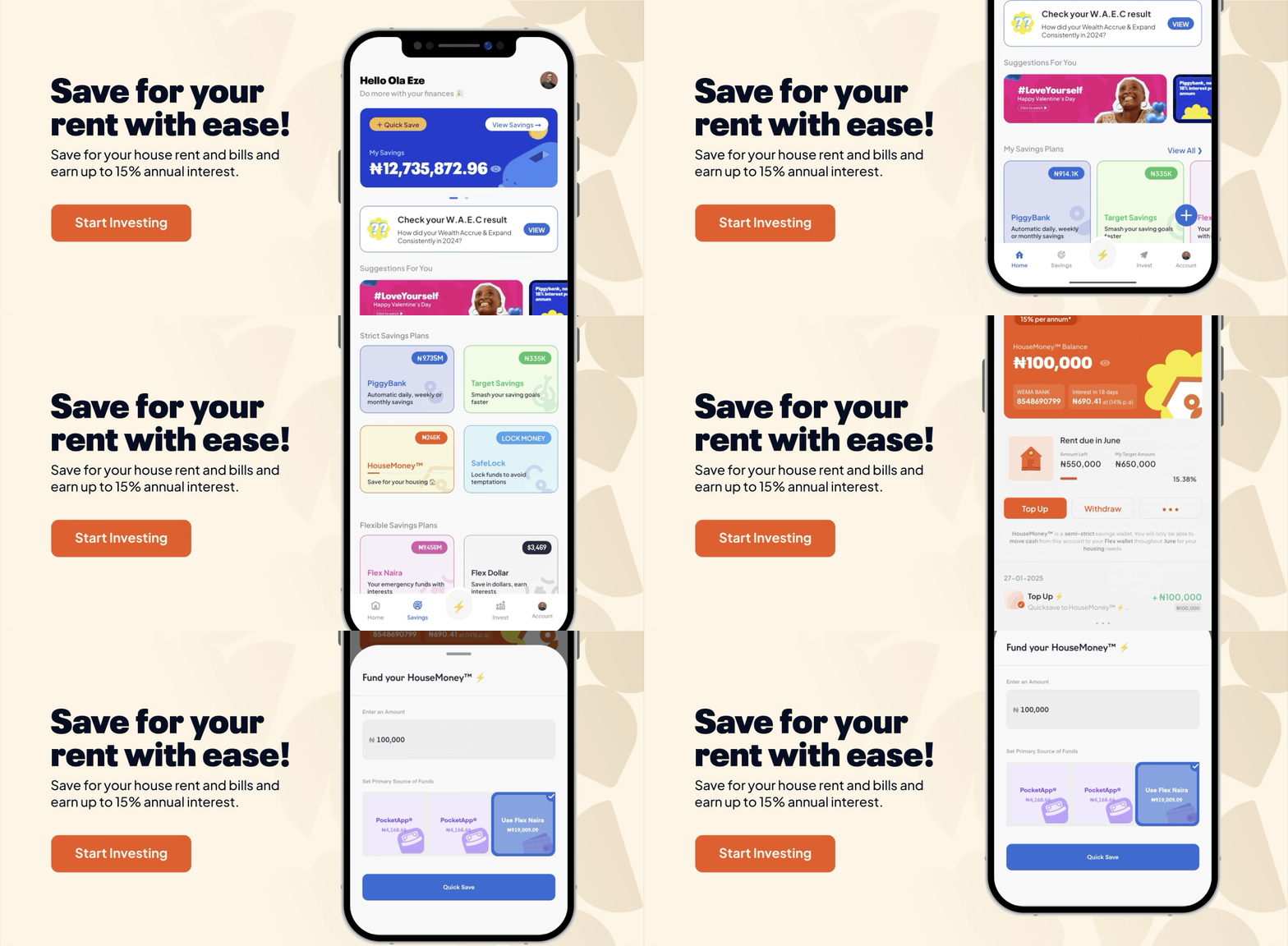
We created HouseMoney™ for savers who want a dedicated Piggyvest feature for rent and other household bills (including recurrent property maintenance fees and whatever yearly home-related bills you handle). With this semi-strict plan, you can avoid rent-related stress by breaking the funds into periodic savings, all while earning 14% yearly interest. The best part? You get your interest monthly!
It’s like Target Savings, but for rent and with higher interest rates!
Want to get in on the action? Well, here’s how to use the HouseMoney™ feature on Piggyvest:
- Log in to your Piggyvest account.
- Click on “Savings.”
- Scroll down and select “HouseMoney™.”
- Fill in the required fields.
Once you have completed this process, we’ll generate an account number just for you. You can transfer from your regular bank to this account number, and the funds will reflect in your HouseMoney™ wallet in no time!
Happy saving!
How to use Investify
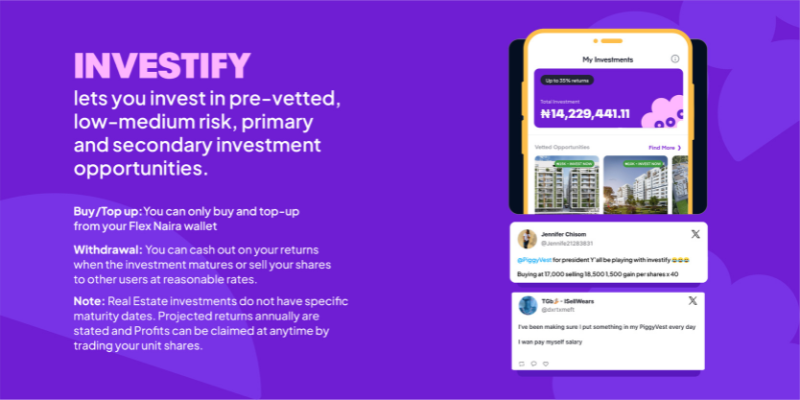
Investify is for Piggyvest users looking to build their investment portfolio and go beyond saving. With this feature, you can earn up to 35% annual interest by investing in safe, low-to-medium risk, primary and secondary investment opportunities.
Here’s how to use Investify on Piggyvest:
- Log in to your Piggyvest app.
- Go to “Invest” and choose an investment opportunity.
- Click on “Invest Now.”
- Type in the number of units you want to buy and click on “Next Step.”
- Confirm your Investment.
- Click on “Invest Now.”

It’s that easy!
Final Thoughts
Installing the app on your phone is one thing, and knowing exactly how to use Piggyvest like a pro is another. We understand. That’s why we crafted this article to serve as the ultimate guide to saving and investing with your Piggyvest account.
Whether you’re a total newbie or a veteran Piggyvest user, this piece is a great resource!